
Redundancy Planning & Failover Systems
Understand how to design redundant systems that keep operations running during equipment failures or maintenance windows.
Read More
Learn how to organize, cable, and maintain server racks effectively. Covers spacing, power distribution, cooling airflow, and safety considerations for proper rack setup.
Server racks aren’t just metal frames holding equipment. They’re the backbone of your data center’s physical infrastructure. When you’re managing dozens—or hundreds—of devices, organization isn’t optional. It’s the difference between smooth operations and costly downtime.
Whether you’re setting up your first rack or optimizing an existing installation, the fundamentals remain constant. Proper cable management, adequate cooling, secure mounting, and clear labeling create a foundation that supports your entire operation. We’re going to walk through each of these areas so you can build racks that are both efficient and maintainable.
The standard 19-inch server rack has been the industry norm since the 1980s, and for good reason. It’s a proven form factor that works across manufacturers and equipment types. Most racks come in heights of 42U or 47U—the “U” stands for rack units, where 1U equals 1.75 inches of vertical space.
Understanding these dimensions matters because it affects everything you do. A 2U server takes up twice the vertical space of a 1U device. If you’re planning a rack layout, you need to know exactly what you’re working with. Don’t just assume—measure your equipment. We’ve seen installations where mismatched dimensions led to poor airflow and cramped cable runs.
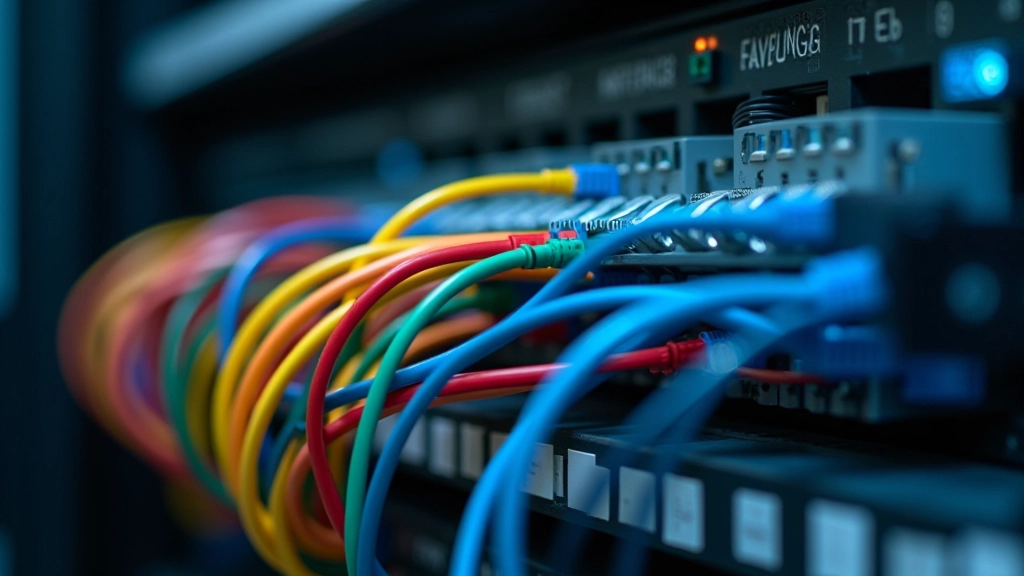
Here’s something we hear constantly: “Why does cable management matter if everything works?” The answer is maintenance and troubleshooting. When you need to swap out a failed switch at 2 AM, a properly managed rack saves you precious minutes. You can identify connections instantly instead of tracing cables through a tangled mess.
Start with structured cabling runs. Most racks have management arms on the sides—use them. Route cables through these channels rather than across the face of the rack. This keeps airflow paths clear and makes visual inspection easier. Label every cable at both ends with consistent naming conventions. Whether you use numbers, device names, or port identifiers, consistency is what matters.
Cable management isn’t just about aesthetics—it directly impacts cooling efficiency. Tangled cables block airflow. Blocked airflow means higher temperatures. Higher temperatures reduce equipment lifespan and increase failure rates. We’ve documented cases where proper cable management alone reduced operating temperatures by 3-5 degrees Celsius.
Understand how to design redundant systems that keep operations running during equipment failures or maintenance windows.
Read More
Master the standards for organized cabling systems. Covers CAT6A specifications, installation best practices, and compliance requirements.
Read More
Improve network performance by optimizing bandwidth usage. Learn about traffic prioritization and congestion management strategies.
Read MorePower distribution units (PDUs) are the veins of your rack infrastructure. They deliver electricity to every device, and they’re also critical safety components. Don’t underestimate their importance. A single overloaded PDU can cascade into a facility-wide power issue.
Calculate your total power draw before installation. Add 20% overhead for future growth. If your peak load is 3,000 watts, use a 3,600-watt rated PDU. This isn’t just a nice-to-have—it’s a safety requirement. Overloaded circuits generate heat, degrade connections, and create fire hazards.
Use monitored PDUs when possible. They give you real-time visibility into power consumption per outlet. This data is invaluable for capacity planning and troubleshooting. If you see one outlet consuming significantly more power than expected, you’ve got a diagnostic clue. It might indicate a failing power supply in one of your devices.
This guide provides educational information about server rack management fundamentals. Individual implementation outcomes and results vary depending on your specific infrastructure, environment, equipment choices, and operational practices. Always consult with qualified data center professionals and follow manufacturer guidelines for your specific hardware before making infrastructure changes.

Heat is your rack’s worst enemy. Every watt of power consumed becomes heat that needs to escape. If you don’t manage airflow properly, equipment temperatures rise, performance degrades, and failure rates accelerate. Modern data centers use hot/cold aisle containment to manage this effectively.
The concept is straightforward: cool air flows in from one side, hot air exhausts from the other. Orient your racks so they work with this pattern. Equipment intake fans should face the cold aisle. Exhaust vents should face the hot aisle. Don’t block vents with cables or blanking panels in the wrong spots.
Monitor temperatures consistently. Most enterprise equipment has temperature sensors that report via SNMP or similar protocols. Use this data. Set alerts for temperature thresholds—typically 30-35 degrees Celsius for normal operation. If you’re consistently hitting 40+ degrees, you’ve got an airflow problem that needs attention.
Editorial Team
Written by the CoreStack Infrastructure editorial team, focused on practical, honest guidance for data center and network infrastructure professionals.
Server rack management doesn’t require expensive equipment or complex procedures. It requires discipline and planning. Start with the fundamentals: understand your rack standards, organize your cables, plan your power distribution, and manage your airflow. These four elements create a stable foundation for everything else.
Don’t try to optimize everything at once. If you’re inheriting a poorly managed rack, tackle cable management first. It’s the highest-impact change you can make. Then move to power distribution, cooling, and ongoing monitoring. Each improvement builds on the previous one.
The best rack is one you can work with confidently. Whether you’re troubleshooting a connectivity issue at 3 AM or planning a capacity upgrade, proper fundamentals mean you’ll have clarity instead of frustration. That’s the real value of good rack management.